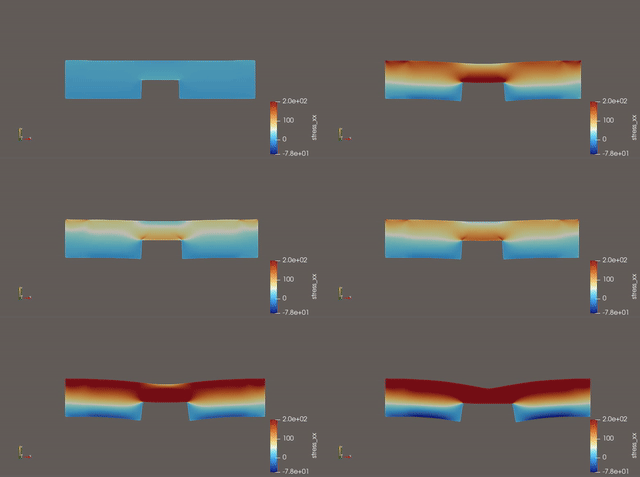
ElmerFEM is an open source multiphysics code, capable of
coupling several different phenomena in a single run. It can couple the
physics in both a loosly/iterative system or in a monolithic/strong
form.
MFront does not have a specialised interface for
ElmerFEM’s advanced material behaviours.
ElmerFEM added support for Abaqus/Standar’s
UMAT interface in the last couple of releases. Using this
same interface, which is also supported by MFront, we can
add MFront capabilities to ElmerFEM’s finite
strain solver. This solver lacks any advanced material laws beyond
finite elasticity. This is where the value of MFront comes
into place: it brings a large amount of easy and complete material laws
and behaviours to ElmerFEM.
Elastic Solver
(Procedure = "ElasticSolve" "ElasticSolver") is
supported.As indicated above, ElmerFEM reuses the same interface
as Abaqus/Standard. In order to use MFront
with ElmerFEM, the Abaqus/Standard interface
has to be built as indicated here.
In the ElmerFEM side, for the input file
(ElmerFEM uses the .sif extension for its
simulation input) the following material declaration has to be done (as
documented in the official
ElmerFEM documentation.
Material 1
  ! UMAT Law

  Number of State Variables = Integer 1 ! Internal state variables to be saved (one for damage)

  Number of Material Constants = Integer 5 ! Number of constants to be read by the behaviour
  ! List material constants as {Young, Poisson, Bt, e0, a}: required by FichantLaBorderieDamage
  Material Constants(5) = Real 210000.0 0.30 50 0.0017 2
  Density = 0.0 ! Reference density used by ElmerFEM
  Reference Temperature = 270.0 ! Reference temperature used by ElmerFEM

  ! Indicate where the compiled behaviour lives and which Element type is going to be used
  UMAT Subroutine = File "./src/libABAQUSBEHAVIOUR" "FICHANTLABORDERIEDAMAGEBEHAVIOUR_PSTRAIN"
  Name = "FICHANTLABORDERIEDAMAGEBEHAVIOUR_PSTRAIN"  ! This specifies the CMNAME argument of UMAT!

  ! We can then have any other extra material parameters as needed in ElmerFEM
  ! for other physical phenomena, such as heat transfer, electromagnetism...
End

Solver 1
  element="p:2"
  Equation = Linear elasticity
  Procedure = "ElasticSolve" "ElasticSolver"
  ...
  Displace Mesh = True
End
As can be seen in the example above, in ElmerFEM we need
to set up the following variables:
MFront file.ElmerFEM only.PATH for the compiled
behaviour.
*_PSTRAIN subroutine generated by MFront.CMNAME as needed by
UMAT. This value is generally inconsequential unless we are
compiling several laws in the same file.
ElmerFEM we can create several materials, such as
Material 2 and have a completely different
MFront behaviour or any other as needed.As previously indicated, the Abaqus/Standard interface
is used. This interface can be built by passing the
--interface=abaqus option to MFront:
$ mfront --interface=abaqus --obuild SaintVenantKirchhoffElasticityTotalLagrangian.mfront

Treating target : all
The following library has been built :
- libABAQUSBEHAVIOUR.so :  SAINTVENANTKIRCHHOFFELASTICITYTOTALLAGRANGIAN_AXIS SAINTVENANTKIRCHHOFFELASTICITYTOTALLAGRANGIAN_PSTRAIN SAINTVENANTKIRCHHOFFELASTICITYTOTALLAGRANGIAN_3D
Here we are using the
SaintVenantKirchhoffElasticityTotalLagrangian.mfront
example file. As we can see, MFront then indicates the name
of the library/binary that it has built and all the different element
options (_AXIS, _PSTRAIN and _3D)
for which the behaviour has been created. It is up to the user to then
use the right element routine for the corresponding geometry that is
being simulated.
The use of this interface has been documented in the following Github
discussion and in the following ElmerFEM blogs: Advanced
material behaviours, Fracture
Mechanics application. The code example and image have been taken
from Notch-Plasticity-Damage
example repository.