A tutorial introduction
This tutorial describes how to describe in MFEM/MGIS a tensile test
on a notched beam made of an isotropic plastic behaviour with linear
hardening in the logarithmic space. This tutorial highlights the key
features of this project.
The full code is available in the mfem-mgis-examples repository in
ex2 directory: https://github.com/latug0/mfem-mgis-examples
Description of the test case
This tutorial considers a tensile test on a notched beam which is modelled by plastic behaviour at finite strain:
The geometry and the mesh is described in Section Geometry and mesh.
The boundary conditions are described in Section Boundary conditions.
The mechanical behaviour is described in Section Mechanical behaviour.
This case is a variant of another one available on code-asterweb
site:
https://www.code-aster.org/V2/doc/v10/fr/man_v/v6/v6.01.303.pdf
Geometry and mesh
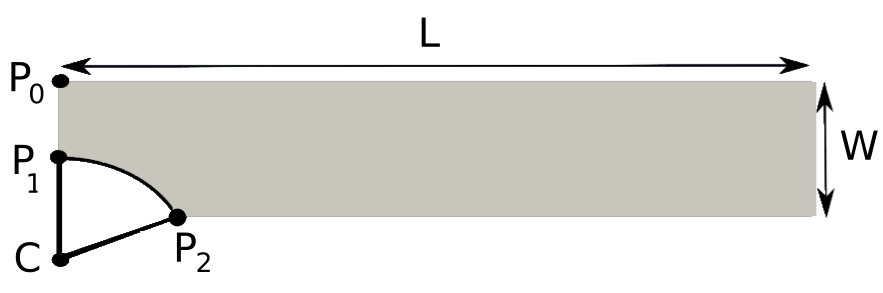
Mesh used to describe the notched beam
For symmetry reasons, only a quarter of the notched beam is represented in Figure Mesh used to describe the notched beam. Its length \(L\) is 30 mm. Its width \(W\) is 5.4 mm.
The positions of the points \(P_{1}\), \(P_{2}\) and \(C\) are respectively \((3\,\mathrm{mm}, 0)\), \((5.4\,\mathrm{mm}, 4.8\,\mathrm{mm})\) and \((9\,\mathrm{mm}, 0)\).
This notched beam has been meshed using Cast3M and exported in the MED
file format proposed and used by Salomé platform. This file has been
converted in the msh file format using
gmsh tool in order to import it easily in
MFEM.
Note
MED files are read directly when MFEM is built with MED
support.
Modelling hypothesis
The beam is treated using the plane strain modelling hypothesis. In finite strain, this assumes that the axial component of the deformation gradient is set equal to 1.
Boundary conditions
Dirichlet boundary conditions force the solution to attain certain prescribed values a priori on some boundaries. The vertical displacement is blocked on the bottom line \(y=0\). A vertical displacement \(U_{y}\) is imposed at the top of the beam \(y=L\).
The symmetry axis on the left is blocked in the x-direction.
Mechanical behaviour
Description
The material of the notched beam is described by a simple isotropic elasto-plastic behaviour with isotropic hardening in the logarithmic space [MAL02] and is implemented using the MFront code generator.
This behaviour is characterized by four parameters:
The
Young Modulus(\(E\)) is the slope of the linear part of the stress-strain curve for a material under tension or compression (isotropic elastic material).The
Poisson Ratio(\(\nu\)) is the coefficient to characterize the contraction of the material perpendicular to the direction of the force applied.The
Yield Strength(\(\sigma_{0}\)) defines the point on the stress versus strain curve where the material initially starts to go into plastic strain.The
Strain Hardening Modulus(\(H\)) defines the slope of the stress versus strain curve after the point of yield of a material.
In our example the following values are used:
Compilation of the MFront behaviour
The previous values are hard-coded in the MFront file. The
MFront implementation is stored in a source file called
IsotropicLinearHardeningPlasticity.mfront. This file must be compiled
before the execution of our MFEM/MGIS C++ example which will be
detailed in depth in Section Numerical resolution. Compilation is
performed as follows:
mfront --obuild --interface=generic IsotropicLinearHardeningPlasticity.mfront
Treating target 'all'
The following library has been built :
- libBehaviour.so :  IsotropicLinearHardeningPlasticity_AxisymmetricalGeneralisedPlaneStrain
  IsotropicLinearHardeningPlasticity_Axisymmetrical
  IsotropicLinearHardeningPlasticity_PlaneStrain
  IsotropicLinearHardeningPlasticity_GeneralisedPlaneStrain
  IsotropicLinearHardeningPlasticity_Tridimensional
Numerical resolution
Initialization of the resolution
The initialize function must be called at the very beginning of the
main function to process the command line arguments:
mfem_mgis::initialize(argc, argv);
The ``mfem_mgis`` namespace
All the classes and functions of the
MFEM/MGISproject are placed in themfem_mgisnamespace.
This call is mostly useful in parallel and handles:
The initialization of interprocess communications handled by the
MPIframework.The initialization of the PETSc scientific toolkit, if supported and requested.
Execution context
Most functions of the library take an execution context as first argument. This context stores the error messages:
auto ctx = mfem_mgis::Context{};
auto or_die = ctx.getFatalFailureHandler();
These functions report their failures. The or_die handler stops the
program with the error message when a failure occurs:
problem.update(ctx) | or_die;
Constant variables
The code then defines some constant variables defining the path to the
mesh file, the path to the MFront shared library, and the name of
the behaviour:
const char* mesh_file = "ssna303.msh";
const char* library = "src/libBehaviour.so";
const char* behaviour = "IsotropicLinearHardeningPlasticity";
Command line options
The numerical resolution can be parametrized using command line options
by relying on the MFEM facilities provided by the OptionsParser
class.
The proposed implementation allows the following options:
--orderwhich specifies the finite element order (polynomial degree).--nbstepsand--end-timewhich specify the number of time steps and the end time of the loading.--reference-filewhich specifies a file of reference values of the resultant force. No comparison is made if it is empty.--paralleland--no-parallelwhich specify if the simulation must be run in parallel.--use-fbarwhich selects the FBar formulation.--standard-reference-filewhich specifies a file of reference values computed without FBar. They are compared with a larger tolerance.
The last two options require MGIS built with TFEL.
Those options are associated with local variables which are default initialized as follows:
  bool use_fbar = false;
  const char* reference_file = "";
  const char* standard_reference_file = "";
#if defined(MFEM_USE_MUMPS) && defined(MFEM_USE_MPI)
  bool parallel = true;
#else
  bool parallel = false;
#endif
  auto order = 1;
  auto nbsteps = 50;
  auto end_time = mfem_mgis::real{1};
If left unchanged, those default values select:
a parallel computation if
MFEMwas built withMPIandMUMPSsupport and a sequential computation otherwise.the use of linear elements.
50 time steps from 0 to 1.
the standard formulation, without FBar.
no comparison to reference values.
If MFEM was built with support of PETSc library, the following
options are added by the mfem_mgis::declareDefaultOptions function:
--use-petscwhich specifies that linear and non linear solvers of thePETSctoolkit must be used.--petsc-configuration-filewhich specifies a configuration file for thePETSctoolkit.
In practice, an object of the class mfem::OptionsParser is declared.
The expected options are declared and the Parse method is called:
mfem::OptionsParser args(argc, argv);
mfem_mgis::declareDefaultOptions(args);
args.AddOption(&order, "-o", "--order",
"Finite element order (polynomial degree).");
args.AddOption(&nbsteps, "-ns", "--nbsteps", "Number of time steps.");
args.AddOption(
&end_time, "-et", "--end-time",
"End time. The displacement of the upper boundary is 6e-3 * t.");
args.AddOption(&reference_file, "-rf", "--reference-file",
"Reference values of the resultant force on the upper "
"boundary, no comparison if empty.");
args.AddOption(¶llel, "-p", "--parallel", "-no-p", "--no-parallel",
"Perform parallel computations.");
#ifdef MGIS_HAVE_TFEL
args.AddOption(&use_fbar, "-fb", "--use-fbar", "-no-fb", "--no-use-fbar",
"Use the FBar formulation.");
args.AddOption(&standard_reference_file, "-srf", "--standard-reference-file",
"Reference values of the resultant force on the upper "
"boundary computed without FBar, compared with a larger "
"tolerance, no comparison if empty.");
#endif /* MGIS_HAVE_TFEL */
args.Parse();
if (args.Help()) {
args.PrintUsage(mfem_mgis::getOutputStream());
mfem_mgis::finalize();
return EXIT_SUCCESS;
}
if (!args.Good()) {
args.PrintUsage(mfem_mgis::getOutputStream());
mfem_mgis::abort(EXIT_FAILURE);
}
Declaring the non linear problem
The non linear evolution problem is defined as follows:
auto problem =
    mfem_mgis::construct<mfem_mgis::NonLinearEvolutionProblem>(
        ctx,
        mfem_mgis::Parameters{
            {"MeshFileName", mesh_file},
            {"FiniteElementFamily", "H1"},
            {"FiniteElementOrder", order},
            {"UnknownsSize", dim},
            {"Materials", mfem_mgis::Parameters{{"NotchedBeam", 1}}},
            {"Boundaries", mfem_mgis::Parameters{{"LowerBoundary", 3},
                                                 {"SymmetryAxis", 4},
                                                 {"UpperBoundary", 2}}},
            {"Hypothesis", "PlaneStrain"},
            {"Parallel", parallel}}) |
    or_die;
The construct function calls the constructor of the
NonLinearEvolutionProblem class. This constructor takes an
object of Parameters type which is able to store various kinds of
data in a hierarchical structure. The valid parameters for the
construction of a non linear evolution problem are described in the
doxygen documentation of the NonLinearEvolutionProblem class.
The NonLinearEvolutionProblem class is the main class manipulated by
the end-users of the MFEM/MGIS library. It is meant to handle all
the aspects of the non linear resolution.
Thanks to the Parameters type, which is used at different locations
in the interface of the NonLinearEvolutionProblem class, the
MFEM/MGIS exposes a high level API (Application Programming
Interface) which hides (by default) all the details related to
parallelization and memory management. For example, the parameter
Parallel allows switching from a sequential computation to a parallel
one at runtime.
Input files and ``python`` wrappers
This high level API can be used to configure a resolution from an input file or to wrap the library in
python. Those features are not yet implemented.
Although based on the MFEM library, the standard end-user of the
MFEM/MGIS library would barely ever directly use the MFEM
data-structures. However, the MFEM/MGIS library does not preclude directly using the MFEM
data-structures, built-in non linear forms,
etc. This lower level API is however not described in this tutorial.
Naming boundaries and materials
MFEM distinguishes elements of the mesh (materials and boundaries)
by integers. This may seem unpractical to most users. The Materials
and Boundaries parameters of the construct function associate names
to these integers.
The names defined in the mesh file are also read, such as the physical names
of the msh file format generated by gmsh. The names given by the user
take precedence.
Declaring the mechanical behaviour
The following line associates a mechanical behaviour to the first material:
problem.addBehaviourIntegrator(ctx, "Mechanics", "NotchedBeam", library,
                               behaviour) |
    or_die;
The four arguments of the addBehaviourIntegrator method following the
execution context are:
The type of physical problem described. Currently two types of physical problems are supported out of the box by the library:
MechanicsandHeatTransfer. Support for other physical problems can be plugged in at runtime if needed.The material identifier, as defined in the mesh file. This identifier may be either an integer or a string. In the latter case, the string is interpreted as a regular expression, a feature introduced by the
Licosfuel performance code and which proved very practical in many cases [HBM01].The shared library containing the behaviour to be used.
The name of the behaviour to be used.
With the --use-fbar option, the Regularization parameter selects the
FBar formulation:
problem.addBehaviourIntegrator(
    ctx, "Mechanics", "NotchedBeam", library, behaviour,
    {{"Regularization",
      mfem_mgis::Parameters{{"FBar", mfem_mgis::Parameters{}}}}}) |
    or_die;
The FBar formulation avoids the volumetric locking of linear elements, due to the incompressibility of the plastic flow.
Information associated with the behaviour and automatic memory management
Thanks to the
MGISproject [HBF+20], all the information related to the mechanical behaviour is retrieved, including:
The type of behaviour (finite strain mechanical behaviour in this case).
The names of material properties, parameters, state variables and external state variables.
etc.
The memory required to store the state of the materials is automatically allocated.
Initialisation of the temperature
The following lines define a uniform temperature on the material at the beginning of the time step and at the end of time step:
auto& m1 = problem.getMaterial(ctx, "NotchedBeam", 0) | or_die;
mgis::behaviour::setExternalStateVariable(ctx, m1.s0, "Temperature", 293.15) |
    or_die;
mgis::behaviour::setExternalStateVariable(ctx, m1.s1, "Temperature", 293.15) |
    or_die;
Defining the temperature is required by all MFront behaviours.
The last argument of the getMaterial method is the identifier of the
behaviour integrator of the material. The object returned by this method is a
thin
wrapper around the MaterialDataManager provided by the MGIS project
[HBF+20].
In the previous lines, m1.s0 and m1.s1 denote respectively the
state of the material at the beginning of the time step and at the end
of the time step.
Boundary Condition
The NonLinearEvolutionProblem class allows defining uniform
Dirichlet boundary conditions (imposed displacement) using the
addUniformDirichletBoundaryCondition method as follows:
problem.addUniformDirichletBoundaryCondition(
    ctx, {{"Boundary", "LowerBoundary"}, {"Component", 1}}) |
    or_die;
problem.addUniformDirichletBoundaryCondition(
    ctx, {{"Boundary", "SymmetryAxis"}, {"Component", 0}}) |
    or_die;
problem.addUniformDirichletBoundaryCondition(
    ctx, {{"Boundary", "UpperBoundary"},
          {"Component", 1},
          {"LoadingEvolution", [](const auto t) {
             const auto u = 6e-3 * t;
             return u;
           }}}) |
    or_die;
Again, the code is almost self-explanatory. If the value of the imposed
displacement is not specified (using the LoadingEvolution
parameter), the selected component is set to zero. The
LoadingEvolution parameter allows specifying the evolution of the
imposed displacement using a function of time (defined here using a
C++ lambda expression).
Non linear solver parameters.
If PETSc is not used, the following lines set the prediction policy and
the parameters of the Newton-Raphson solver used to find the equilibrium of
the whole structure:
if (!mfem_mgis::usePETSc()) {
  problem.setPredictionPolicy(
      {.strategy =
           mfem_mgis::PredictionStrategy::BEGINNING_OF_TIME_STEP_PREDICTION});
  problem.setSolverParameters(ctx, {{"VerbosityLevel", 0},
                                    {"RelativeTolerance", 1e-6},
                                    {"AbsoluteTolerance", 0.},
                                    {"MaximumNumberOfIterations", 10}}) |
      or_die;
}
The default prediction only imposes the increment of the displacement on the
upper boundary. It concentrates this increment in the elements next to this
boundary. The BEGINNING_OF_TIME_STEP_PREDICTION strategy solves a linear
problem with the elastic operator. It spreads the increment over the whole
structure.
Valid parameters for the setSolverParameters are described in the
doxygen documentation of the library.
If PETSc is used (see the --use-petsc command line option), the
parameters associated with the choice of the non linear solver must be
provided by an external configuration file (see the
--petsc-configuration-file command line option).
Selection of the linear solver
If PETSc is not used, the linear solver can be selected using the
setLinearSolver method. Here we select MUMPS, in parallel and
UMFPack in sequential:
if (!mfem_mgis::usePETSc()) {
  if (parallel) {
    problem.setLinearSolver(ctx, "MUMPSSolver", {}) | or_die;
  } else {
    problem.setLinearSolver(ctx, "UMFPackSolver", {}) | or_die;
  }
}
The second argument is an object of the Parameters type which can be
used to fine tune the linear solver and, in the case of iterative
solvers, optionally define a preconditioner. For direct solvers, no
parameters are required.
Post-processings
The addPostProcessing method lets the user define some built-in
postprocessings.
In this example, we export the displacements for visualization in
paraview and compute the resultant
force on the boundary where the displacement is imposed. The resultant force
is written in force.txt, or in force-fbar.txt with FBar:
const auto* const output_file = use_fbar ? "force-fbar.txt" : "force.txt";
problem.addPostProcessing(
    ctx, "ComputeResultantForceOnBoundary",
    {{"Boundary", 2}, {"OutputFileName", output_file}}) |
    or_die;
problem.addPostProcessing(ctx, "ParaviewExportResults",
                          {{"OutputFileName", "ssna303-displacements"}}) |
    or_die;
problem.addPostProcessing(ctx, "ParaviewExportIntegrationPointResultsAtNodes",
                          {{{"Results", "FirstPiolaKirchhoffStress"},
                            {"OutputFileName", "ssna303-stress"}}}) |
    or_die;
problem.addPostProcessing(
    ctx, "ParaviewExportIntegrationPointResultsAtNodes",
    {{{"Results", "EquivalentPlasticStrain"},
      {"OutputFileName", "ssna303-equivalent-plastic-strain"}}}) |
    or_die;
These post-processings are called using the executePostProcessings
method at runtime using the state at the end of the time step. The
user may also plug in their own post-processing.
Resolution
The NonLinearEvolutionProblem class is meant to solve the problem on
one time step only. This makes it easy to build weakly coupled non
linear resolutions (for example, thermo-mechanical resolutions where the
heat transfer and mechanical problems are solved using a staggered
scheme) or set up couplings with external solvers.
In this tutorial, a local time-substepping scheme is set up to handle resolution failures.
By default, the loading starts at time 0 and ends at time 1. This range is divided into 50 time steps.
const auto nsteps = mfem_mgis::size_type(nbsteps);
const auto dt = end_time / nsteps;
auto t = mfem_mgis::real{0};
auto iteration = mfem_mgis::size_type{};
for (mfem_mgis::size_type i = 0; i != nsteps; ++i) {
  std::cout << "iteration " << iteration << " from " << t << " to " << t + dt
            << '\n';
The local time substepping scheme is simply set up as follows:
auto ct = t;
auto dt2 = dt;
auto nsteps = mfem_mgis::size_type{1};
auto nsubsteps  = mfem_mgis::size_type{0};
while (nsteps != 0) {
  auto converged = problem.solve(ctx, ct, dt2);
  if (converged) {
    --nsteps;
    ct += dt2;
    problem.update(ctx) | or_die;
  } else {
    nsteps *= 2;
    dt2 /= 2;
    ++nsubsteps;
    problem.revert(ctx) | or_die;
    if (nsubsteps == 10) {
      mfem_mgis::abort("maximum number of substeps");
    }
  }
}
Every time a resolution is successful, the material state is updated
using the update method, the current time is incremented and the
number of the remaining substeps is decreased. The loop stops when the
remaining number of sub-steps goes to zero.
If the resolution failed, the local time step is divided by 2, the
number of remaining substeps is multiplied by 2 and the state of the
material is reverted to the beginning of the time step using the
revert method. The resolution stops if more than 10 nested reverts
are generated.
Once a time step has been successful, the post-processings are executed and the time is incremented.
  problem.executePostProcessings(ctx, t, dt) | or_die;
  t += dt;
  ++iteration;
}
Comparison to the reference values
When a reference file is given, the vertical component of the resultant
force is compared to the reference values at each time step. It is read in
the file written by the ComputeResultantForceOnBoundary post-processing.
Only the process writing this file makes the comparison:
if (mfem_mgis::isMainProcess(problem.getFiniteElementDiscretization())) {
  if ((!std::string_view{reference_file}.empty()) &&
      (!checkVerticalForce(output_file, reference_file, 1e-4))) {
    return EXIT_FAILURE;
  }
  if ((!std::string_view{standard_reference_file}.empty()) &&
      (!checkVerticalForce(output_file, standard_reference_file, 1e-3))) {
    return EXIT_FAILURE;
  }
}
The computed times must be the first times of the reference file. The beginning of the loading can thus be compared to the reference values of the whole loading.
The relative tolerance is 1e-4, since the forces are written with 6 significant digits. It is 1e-3 for the reference values computed without FBar, which are only close to the results with FBar.
Running the example
The whole loading is computed by default. The second command uses the FBar formulation:
./ssna303
./ssna303 --use-fbar
The tests of the example compare the resultant force to the reference values. In the full test mode, they compute the whole loading in 40 time steps:
./ssna303 --nbsteps 40 --end-time 1 --reference-file ssna303-force.ref
./ssna303 --use-fbar --nbsteps 40 --end-time 1 \
  --reference-file ssna303-force-fbar.ref \
  --standard-reference-file ssna303-force.ref
In the restricted test mode, they only compute the first two time steps, up to 0.05, during which the plastic flow starts.